Capy bills for two things: model tokens and machine server time. Usage draws from one balance, in dollars, shared by your whole organization.A subscription plan includes a set amount of usage each month at a discount. You can also add balance directly (minimum $5) and enable auto-reload.
Three plans, sized by the monthly credit grant. Annual billing is 12 months upfront at 20% off, with the same credits granted monthly.
Plan
Monthly
Annual (per month)
Credits per month
Capy Lite
$20
$16
$20 of credits
Capy Pro
$100
$80
$105 of credits (+5%)
Capy Max
$200–$1,000
$160–$800
110% of the price (+10%)
Enterprise
Custom
Custom
Custom
Capy Max comes in $100 steps from $200 to $1,000. Every step grants 110% of its price in credits, so $500/mo buys $550 of credits.Try Capy Lite for $1. Your first 7 days cost $1 with a verified card, then $20/mo. One intro per card and per organization. Monthly Lite only.If you use your credits up mid-month, top up manually or with auto-reload.
Every plan includes unlimited members. There is no per-seat price, no included-member limit, and no charge for inviting anyone. Plans size usage, nothing else.
Every model appears once in the model picker, named by the company that makes it: openai/gpt-6-sol, anthropic/claude-opus-5. What a model runs on depends on your connections: the first subscription or key in your list that covers it, or Capy credits if none does.Prices are per 1M tokens and apply to usage on Capy credits. Usage on a subscription or key costs nothing from your balance. A ✓ in the BYOK column means you can run the model on your own key from that provider.
A connected Codex, GitHub Copilot, or SuperGrok subscription covers these models, and usage counts against that plan’s limits instead of your balance. Azure runs through an organization account. Connect one under connections.
Models with a Fast toggle run through the provider’s priority tier at a higher price. When no fast host is available, the request serves at the standard tier and bills at standard rates. Fast rates per 1M tokens:
Most models expose a reasoning effort, from none up to max. Each entry supports its own subset, shown in the picker. An unsupported effort fails before the request is sent. Capy never quietly approximates it with a different setting.
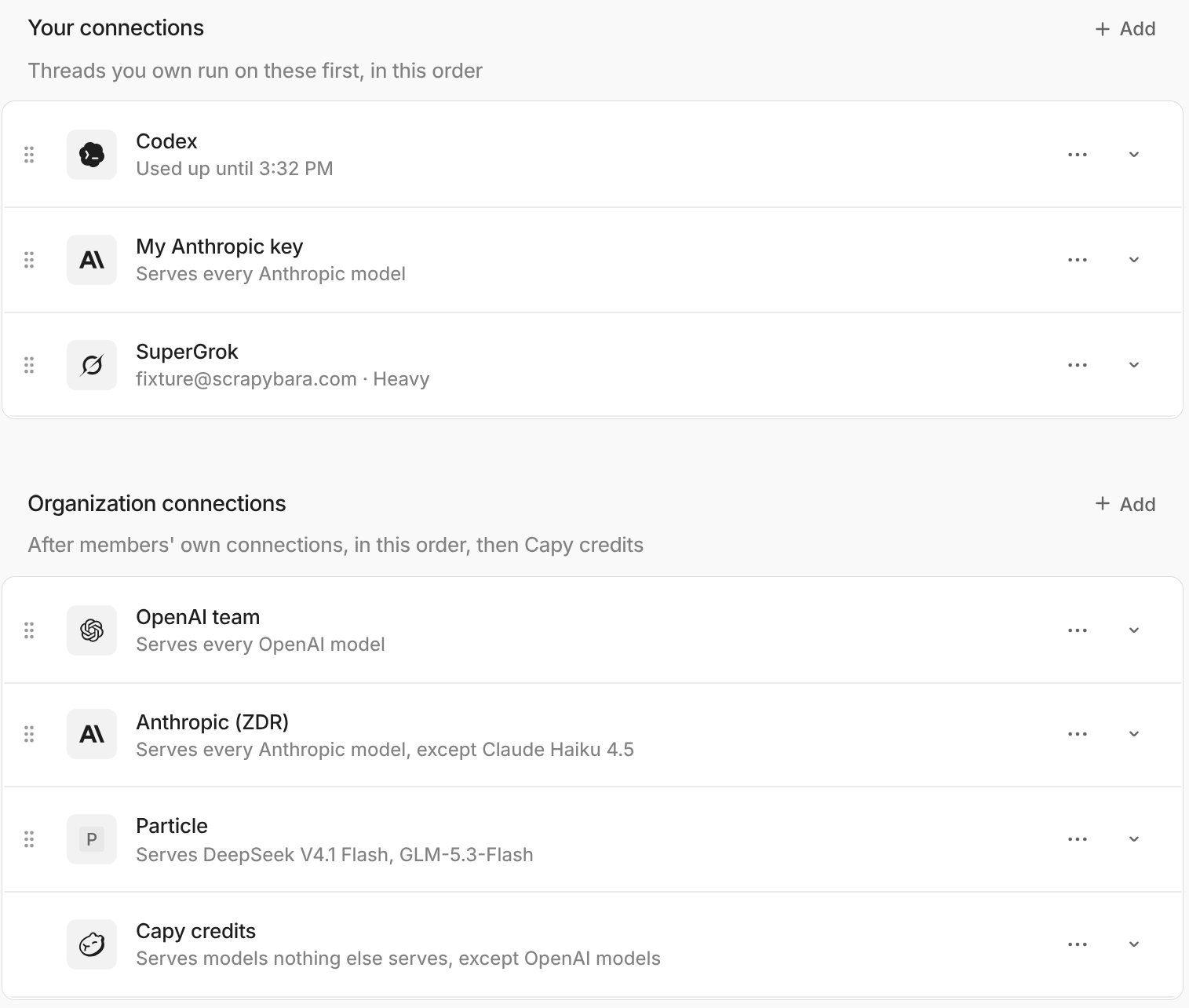
Out of the box every model runs on Capy credits, the balance your organization buys. Connect a subscription or an API key and the models it covers run on that instead, at no cost to your balance. A thread uses the first connection in the list that covers its model: yours first, in your order, then your organization’s, then Capy credits.
1
Open Settings → Models
Settings → Models shows your connections, then the organization’s, then Capy credits. Drag a connection to change its place; Capy credits always stays last. Expand a connection to choose which models it covers.
Your connections, then the organization's, then Capy credits
2
Add a subscription or key
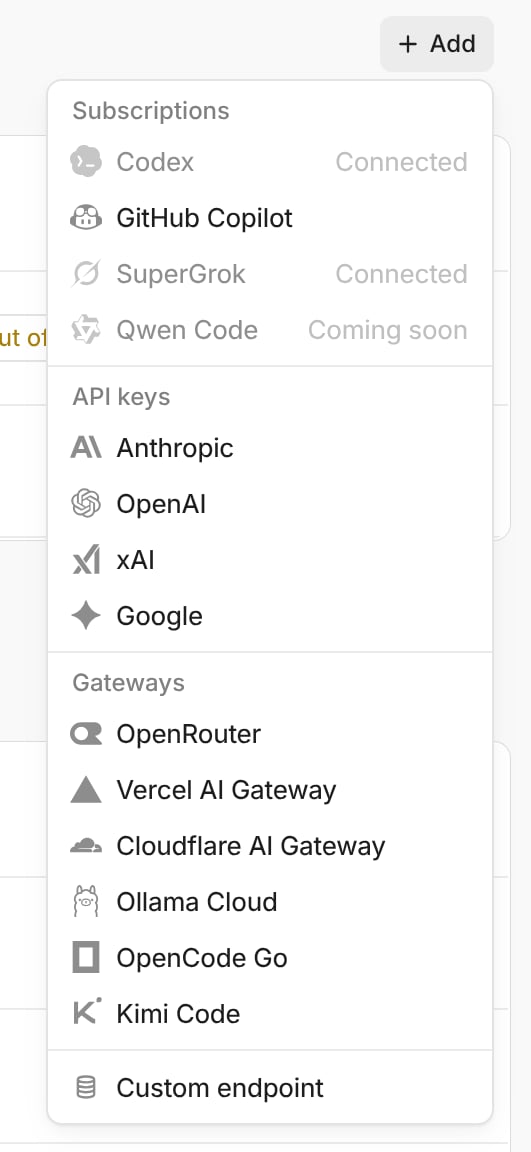
Click Add. A subscription is personal and signs in through your account with that provider; for Codex, turn on Device code authorization in ChatGPT’s security settings first. An API key, a gateway like OpenRouter, or any OpenAI-compatible endpoint can be personal or the organization’s, and needs a paid plan.
Subscriptions, API keys, gateways, and a custom endpoint
3
Check access and connect
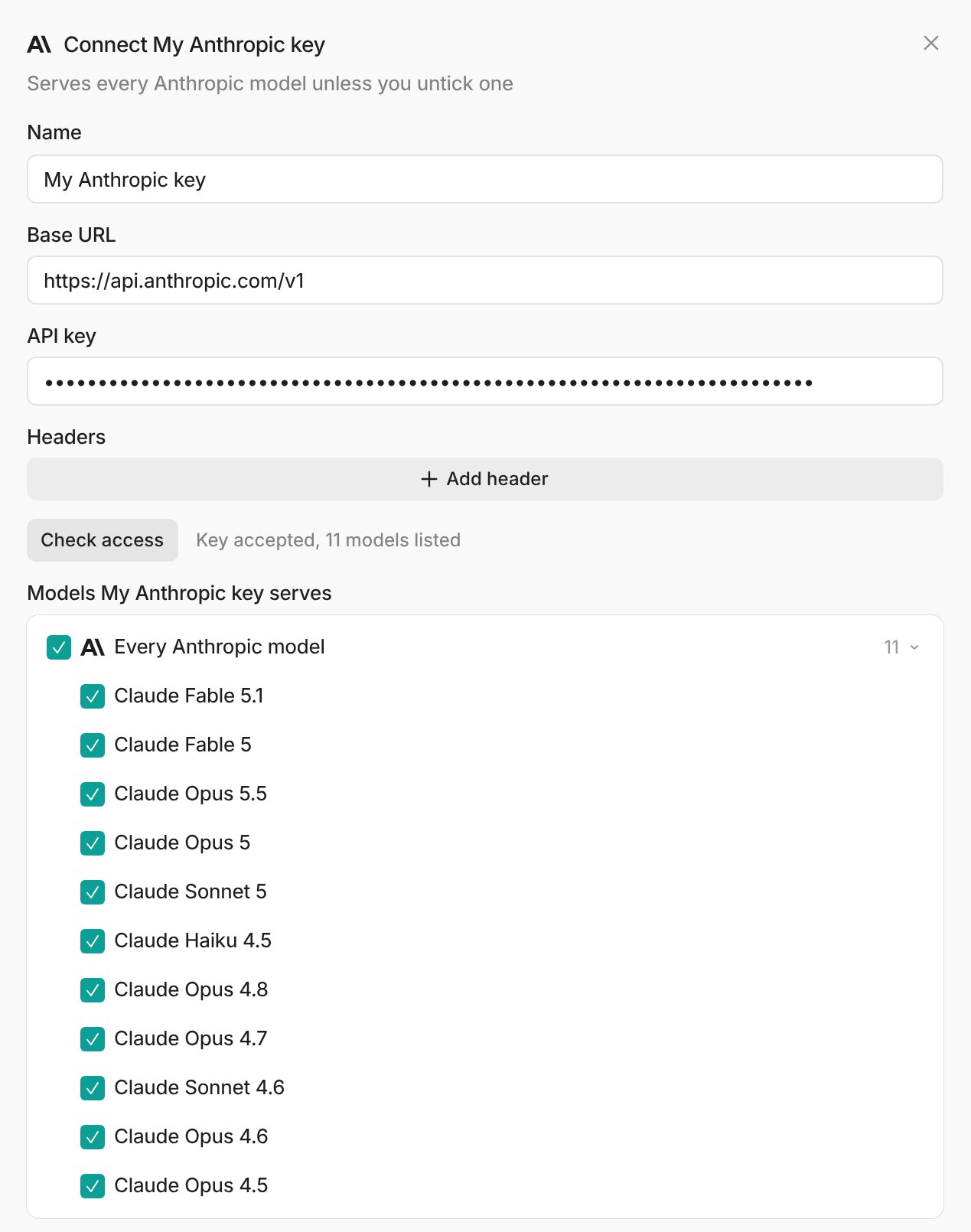
Paste the key and click Check access. Capy lists the models the key can run, all selected; uncheck any you don’t want on this key. An Anthropic, OpenAI, xAI, or Google key also covers new models from that company as they come out. Click Connect.
Check access lists the models the key can run
Later, a key’s ⋯ menu has Test connection, Replace key, Rename, Custom headers, and Remove; a subscription’s has Reconnect and Disconnect.
4
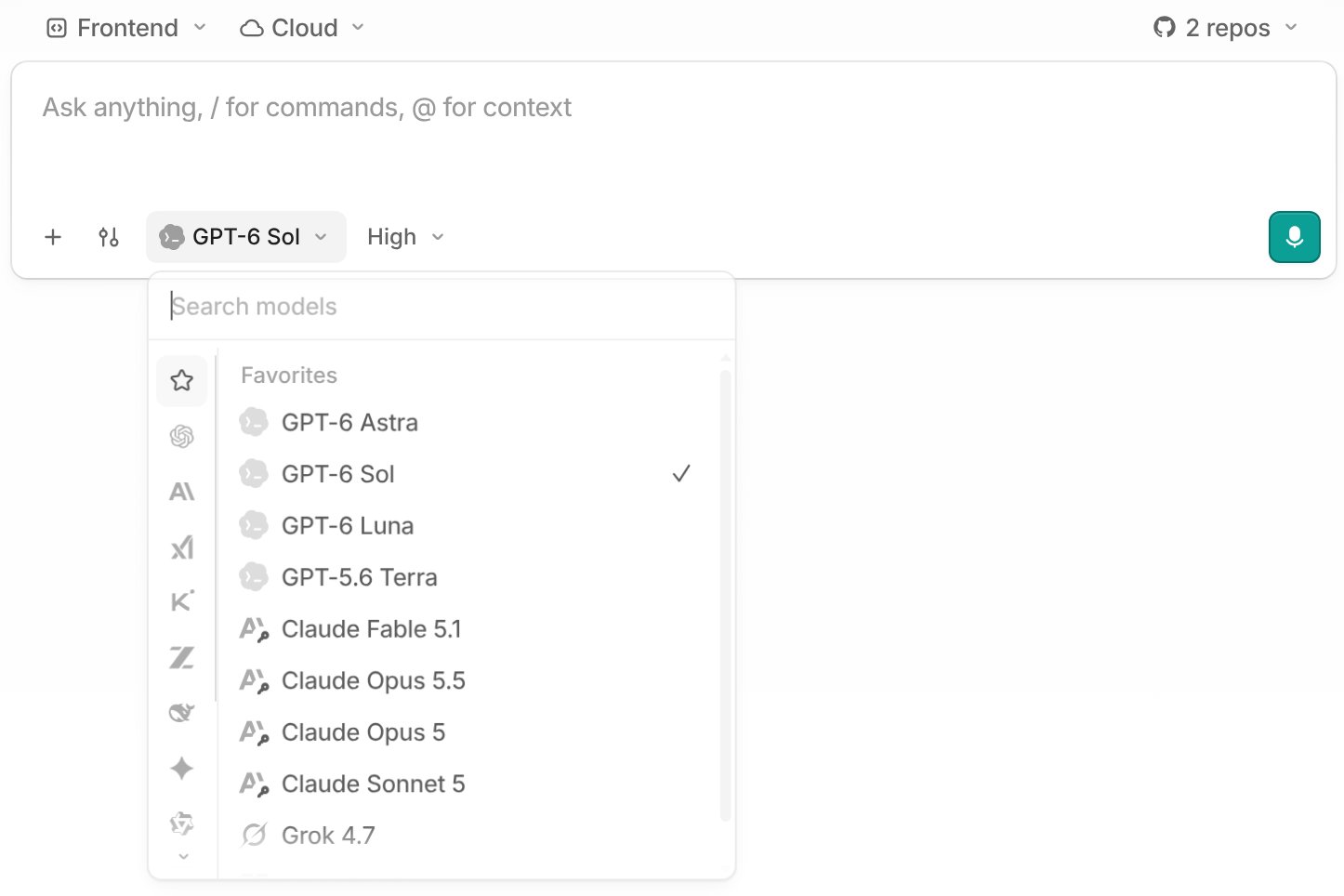
Pick a model
In the model picker, each model shows what it runs on: a subscription’s icon, a key badge, or nothing for Capy credits. Hover the logo for the words, Runs on your Codex subscription. The thread’s cost breakdown marks usage on a subscription or key Unbilled.
One connection at a time. Each message uses the first connection in the list that covers the model: the thread owner’s connections, top to bottom, then the organization’s, then Capy credits. A colleague writing in your thread runs on your connections, never their own.
Each connection covers a set of models. A subscription covers what its plan includes. A key covers every model from its company unless you uncheck one. Capy credits has the same checklist, so an admin can keep a company’s models off the organization’s balance.
What you pay. Usage on a subscription counts against that plan’s limits. Usage on a key is billed by the provider. Only usage on Capy credits and machine time come out of your balance.
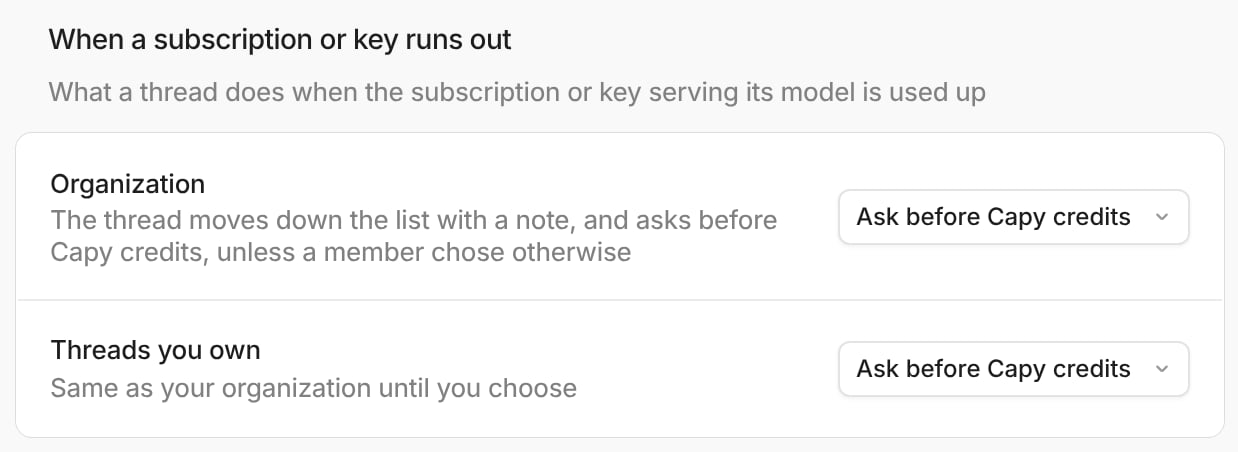
A subscription is used up when it hits its plan’s limit, and works again when the limit resets. A brief rate limit is retried and does not count. A connection can also be turned off, a subscription signed out, and a key rejected. When the first connection in the list cannot run the model for one of these reasons, what the thread does next is one setting on the Models page: an admin sets it for the organization, and can let each member set it for their own threads.A key that has no credit left is different: the message fails with the provider’s error, the setting below does not apply, and the key works again once you top the account up where you manage it.
Setting
Next in line is another subscription or key
Next in line is Capy credits
Ask me
Stops and asks
Stops and asks
Ask before Capy credits (default)
Moves on, with a note in the thread
Stops and asks
Keep going
Moves on, with a note in the thread
Moves on, with a note in the thread
The run-out setting for the organization and for threads you own
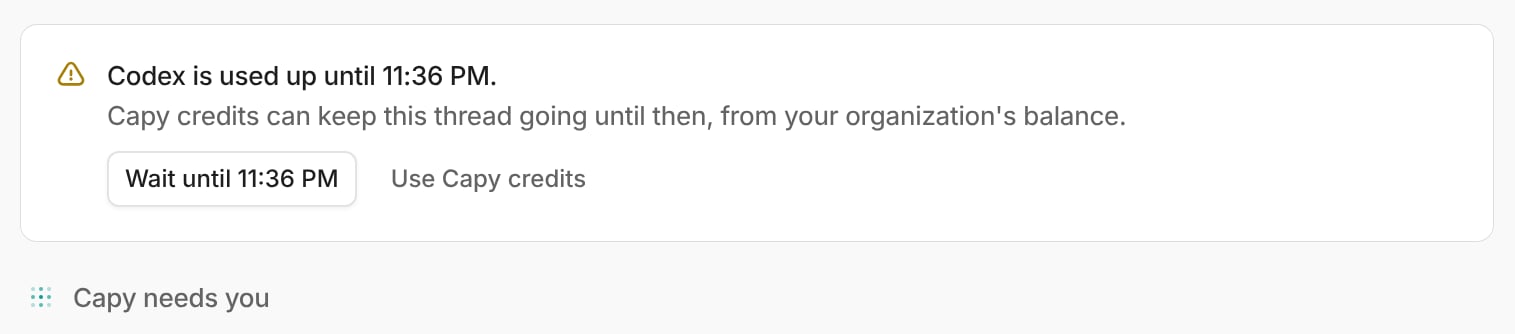
When the thread moves on, it posts one note, Codex is used up until 11:08 PM. Running on OpenAI team key., and goes back to the earlier connection as soon as that works again. When it stops, it shows one card with one question.
Wait for the reset, or use the next connection
Wait holds the thread until the reset. Use continues on the next connection, and from then on the thread keeps going on its own, Capy credits included. Only the thread’s owner can answer. The same card shows in Slack with the same two buttons, and the CLI prints it with /wait and /continue. If nothing in the list can run the model, the thread stops and says so.
Admins manage the organization’s connections and these switches on the Models page; members can see them but not change them.
Members can connect their own subscriptions and keys, on by default. Off hides members’ own lists and runs every thread on the organization’s connections.
Members can choose what happens when a subscription or key runs out, off by default.
In a model’s ⋯ menu in the Models table: Only OpenAI team key (named after the organization’s key for that model) keeps the model on the organization’s keys, never a member’s own connection or Capy credits, for teams with data-handling requirements; Turn off removes the model from every picker in the organization; Compact at sets how full a thread’s context can get before it summarizes its history.
Threads and tasks pick models independently. The agent can run a task on a cheaper model for mechanical work, or a stronger one for a hard subsystem. Tasks follow parent thread models by default.
A thread on Capy credits stops with an out-of-credits card when the balance runs out. Add balance manually or with auto-reload, then send a message; the thread picks up where it left off. A thread on a subscription or key never spends Capy credits without asking first unless your organization set it to keep going; see when a subscription or key runs out.
Each thread runs on its own VM machine, billed hourly by size:
Size
vCPU
RAM
Disk
Cost/hour
Small
1
4 GB
64 GB
$0.10
Medium
2
8 GB
64 GB
$0.20
Large
4
16 GB
64 GB
$0.40
Ultra
8
32 GB
64 GB
$0.80
Hyper
16
64 GB
128 GB
$1.60
Big Guy (enterprise)
16
128 GB
256 GB
$3.20
Large is the default. You pay while a machine is awake, plus a two-minute wind-down when it goes to sleep. A sleeping machine costs nothing, but waking it to extend its uptime for ports, desktop, file viewer will incur a charge. See machines.
Need more than Capy Max’s $1,000/month in credits, custom pricing, or invoiced billing with net terms? We set up a custom plan. Everything else works the same as on standard plans.Contact us →
Subscribe to monthly Capy Lite with a verified card and your first 7 days cost $1, then $20/mo unless you cancel. One intro per card and per organization, ever.
Do members cost anything?
No. Every plan includes unlimited members with no per-seat price, so inviting someone never creates a member charge.
What happens when my balance runs out?
A thread on Capy credits stops with an out-of-credits card. Add balance or let auto-reload top up, then send a message; nothing resumes on its own. A thread on a subscription or key asks before it spends Capy credits.
What happened to my organization's access rules?
Organizations that set up keys and access rules before connections existed were converted once: every key became an organization connection covering that company’s models, a rule that turned a model off stays Off, one that allowed only a subscription unchecks the model on Capy credits and on the organization’s keys, and one that allowed only the organization’s keys became Only that key. Saved model choices keep working: a thread that picked codex/gpt-5.5 still runs on Codex, and one that picked openai/gpt-5.5 while its owner holds a Codex subscription now runs on the subscription, because it is first in the list.
Can I use my ChatGPT subscription or my own API key?
Yes. Connect a Codex, GitHub Copilot, or SuperGrok subscription, or an Anthropic, OpenAI, xAI, or Google key, under Settings → Models. The models it covers run on it and the rest run on Capy credits. When a subscription is used up, the thread asks before spending Capy credits; a key with no credit left fails the message until you top it up. See connections.
Can I switch plans?
Yes, from the billing page. Every plan change applies immediately and may include a prorated charge. Canceling instead keeps the current plan active through the end of its billing cycle.
How do annual plans work?
Annual plans bill upfront for 12 months at a 20% discount. Credits are still granted monthly.
Do I need a subscription at all?
No, you can add balance directly (minimum $5). A plan grants credits monthly at a discount.
Was this page helpful?
⌘I
Assistant
Responses are generated using AI and may contain mistakes.